 Naoba
NaobaA browser your agents share, and your projects don't.
Naoba is a macOS browser that several AI coding agents drive at once. Agents working in the same project share its tabs, its cookies and its logged-in sessions. Agents working in different projects share nothing at all — not a tab, not a cookie, not a login.
Measured · October 2026
Cheaper on every task. Right as often or more. Faster on most.
One agent ran eight real tasks on live sites, three times through Naoba and three times through the browser built into the Claude desktop app: the same model, the same accounts, at the same moment. Each task is compared on its own, from a short read to a long search with many steps.
Cost
1.1×–3.6× cheaper
How many times more the built-in browser cost, median of three runs. The more steps a task takes, the more Naoba saves.
Accuracy
7 of 8 right as often or more
Each square is one run; filled means every checked fact matched the live site. Better on 3, the same on 4, worse on YouTube.
Speed
5 of 8 tasks faster
Bars to the right: Naoba finished sooner; to the left: the built-in browser did. Fewer steps win on long tasks; Gmail came out the same.
Why it exists
Most tools hand an agent your own browser.
That is convenient until two agents work on two different things. A login belonging to one project is then visible to an agent working on another, and nothing prevents it. Naoba is a browser of its own: it starts empty, you sign into what you need inside it, and each project keeps what it was given.
Input a page cannot tell from a person's
Clicks and typing arrive as real events, so pages that reject synthetic input work normally.
A network log, and response bodies
The DevTools protocol is there, not approximated. An agent reads what the page actually received.
A whole scenario per call
An agent writes JavaScript — navigate, act, read, return — instead of one round trip per click.
Somewhere to ask for help
When an agent meets a sign-in or a payment, it hands the tab over, says what it needs and waits for you.
What an agent writes
One call carries the whole flow.
Naoba speaks MCP, so any IDE that connects to an MCP server connects to it. The server takes the agent's working directory, walks up to the repository root, and that is the project.
await api.navigate('https://example.com/dashboard')
if (await api.getText('h1') === 'Sign in') {
  await api.requestHuman('sign in to the dashboard')
}
return await api.getText('.balance')
The window comes forward with that sentence on it, you sign in, and the call resumes when you mark it done. Naoba never puts itself on screen uninvited.
The boundary
One window, and every project apart inside it.
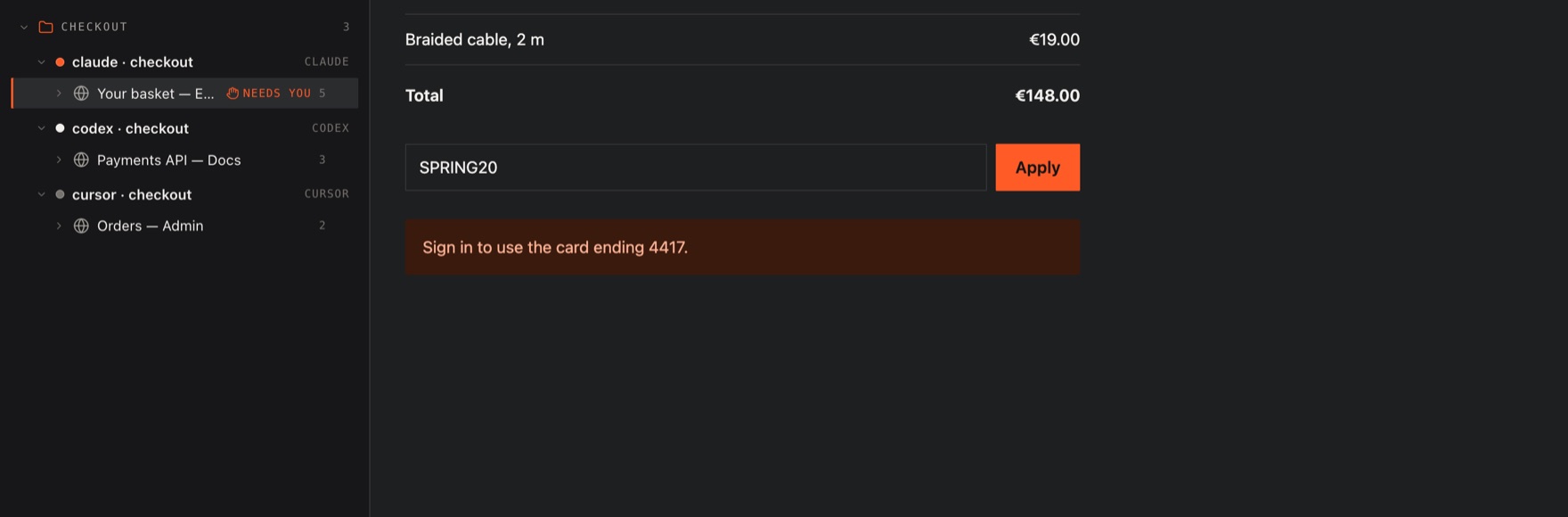
There is no row of tabs across the top. Down the left is a tree: every agent working in this project, under each agent the tabs it has been in, and under each tab the calls it made there. A tab two agents share appears under both, each seeing its own calls. The projects meet only in that list.
A project is asked about once
The first time an agent working in a folder wants a browser, Naoba asks you. The answer is remembered, and you can take it back.
The port is not open to anything
Naoba writes a token for each run into a file only you can read, and closes any connection that does not present it.
Tabs belong to the agent that opened them
They close when its session ends, so a day of agents starting and finishing does not leave a window full of pages nobody is reading.
When an agent is stuck
It asks you, and waits.
A sign-in, a payment, a checkbox only a person should tick. The agent hands the tab over with a sentence saying what it needs; you do it and press the button, and its call carries on.
Price
- The first 30 days are free, and no card is asked for. When they end, nothing is charged until you subscribe.
- 5 EUR a month, or 40 EUR a year. Cancel whenever you like; the key works until the paid period ends.
- VAT is added at the checkout where your country charges it.
- A key that unlocks Naoba on your Mac, and can be moved to another.
- 14 days to change your mind after a payment, for any reason.
You get a key by email and enter it once in Naoba's settings. A key issued before subscriptions keeps working as it was.
DownloadNaoba is unlocked with a key, and until it is unlocked it refuses every agent and says so.
What you need
macOS on Apple silicon. Nothing else to install.
The application is the MCP server, so there is no separate program to launch and no path into the bundle to keep current — your IDE takes one address on this Mac. Naoba opens when you log in; when it is not running, the IDE says it could not connect, and opening Naoba is the whole fix.
claude mcp add --transport http naoba http://127.0.0.1:8899/mcp